
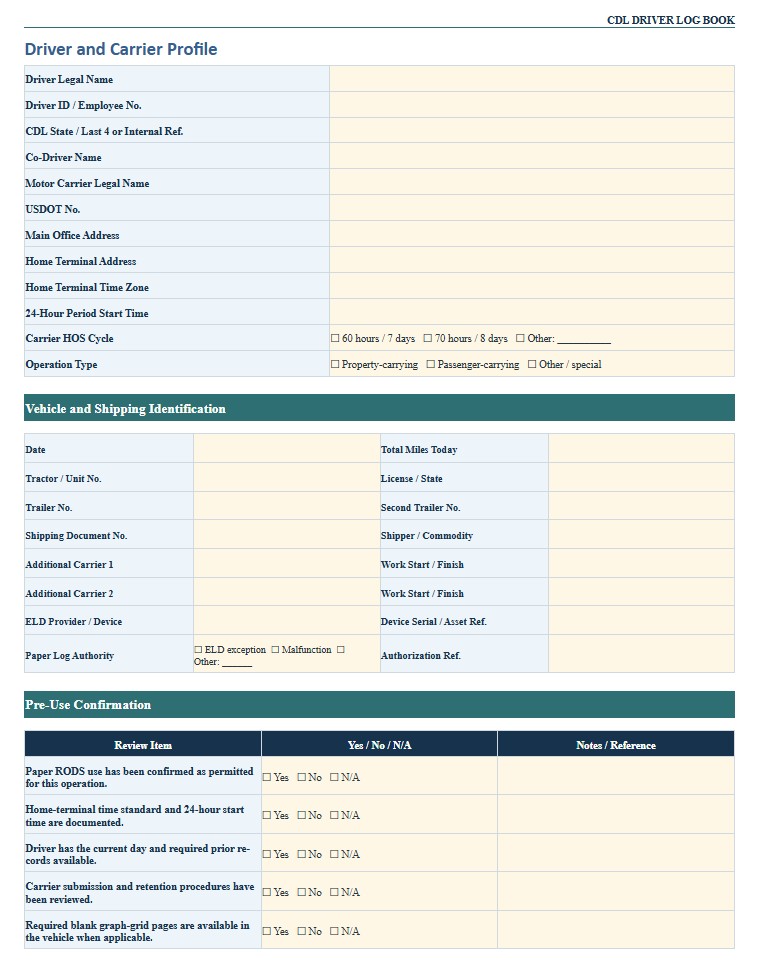
A CDL driver log book is used to document a commercial driver’s daily duty status, driving activity, vehicle information, locations, mileage, shipping references, and supporting records. Drivers, motor carriers, dispatchers, safety managers, and owner-operators may use the template to organize hours-of-service information and review whether a trip can be completed within the applicable limits. A paper log may be appropriate only when paper records are permitted, such as during certain electronic logging device exceptions or qualifying malfunctions. It should not be treated as a substitute for an ELD when federal rules require one. This page provides downloadable Word, PDF, and Excel versions of a CDL driver log book, along with practical guidance for completing the record, checking daily totals, documenting remarks, retaining supporting information, and adapting the template to a carrier’s operating procedures.
Download the CDL Driver Log Book Word Template
The Word format is useful when a driver or motor carrier wants to edit the fields freely, add company branding, customize instructions, create additional daily pages, or adapt the document before printing, sharing, signing, or including it in a driver record packet.

Download the CDL Driver Log Book PDF Template
The PDF format is useful for printing blank daily logs, archiving completed records, sharing a fixed-layout form, or maintaining a consistent page with a duty-status grid, remarks section, certification, vehicle information, and supporting-document references.
Download the CDL Driver Log Book Excel Template
The Excel format is useful for repeatable daily rows, dates, driving hours, on-duty time, mileage, vehicle numbers, shipping references, recap calculations, exception tracking, supporting-document registers, and internal reviews across multiple drivers or reporting periods.
How to Complete and Use This Document
Before using the template as an official hours-of-service record, determine whether the driver is required to maintain a record of duty status and whether an electronic logging device is required. Most drivers who must prepare RODS are subject to the ELD rule, although limited exceptions exist. Drivers using a qualifying short-haul time-record exception may not need a traditional daily log. A paper form may also be used in certain limited situations, including some ELD exceptions or documented device malfunctions. The carrier’s safety or compliance department should confirm which method applies.
Complete the Driver and Vehicle Information
Enter the date, driver’s full name, co-driver when applicable, carrier name, main office address, home terminal address, tractor number, trailer number, shipping document or manifest number, and total miles driven. Use identifiers that match the dispatch record, bill of lading, fuel receipts, toll records, ELD data, and other supporting documents.
The log should cover one complete 24-hour period. Confirm the time zone used by the carrier’s home terminal and apply it consistently. A driver operating across time zones should not switch the log’s time basis during the day merely because the local clock changes.
Record Each Duty-Status Change
Use the graph or time-entry section to record changes among the applicable duty statuses. A traditional property-carrying driver log normally distinguishes off duty, sleeper berth, driving, and on duty not driving. Draw or enter each status from the exact time it begins until the next status change. The total for all duty-status lines should equal 24 hours.
In the remarks section, identify the city and state, or the nearest recognizable location, for each status change. Add a brief explanation when useful, such as fueling, loading, unloading, inspection, roadside delay, vehicle repair, or required break. Do not record loading, fueling, inspections, paperwork, or other work as off-duty time when the driver remains responsible for work-related duties.
Check Hours-of-Service Limits
Property-carrying drivers operating under the standard federal limits generally may drive up to 11 hours after 10 consecutive hours off duty and may not drive beyond the applicable 14-hour driving window. A 30-minute break is generally required after eight cumulative hours of driving without a qualifying interruption. Drivers must also monitor the applicable 60-hour or 70-hour limit over seven or eight consecutive days.
Passenger-carrying operations, oilfield work, agriculture, emergency operations, adverse driving conditions, sleeper-berth use, short-haul operations, and certain other activities can involve different provisions or exceptions. Do not apply the standard property-carrying limits automatically to every CDL operation. Confirm the current federal rule and any applicable state requirements.
Use the Recap and Supporting-Document Sections
When a recap is included, enter the driver’s on-duty hours for each prior day in the applicable seven-day or eight-day period. Add the current day and calculate the remaining hours available. A recap is a planning aid and should be compared with the complete underlying RODS history.
Record references to supporting documents such as bills of lading, dispatch records, trip records, fuel receipts, toll receipts, scale tickets, inspection records, payroll records, and electronic communications. The documents should be consistent with the times and locations shown on the log. Under federal requirements, drivers generally must submit RODS and supporting documents to the motor carrier within the required period, and carriers generally retain the applicable records for six months. Verify the current rule and company procedure before setting retention deadlines.
Review, Certify, and Correct the Log
At the end of the day, total each status line, check that the entries are complete, and compare the log with supporting records. The driver should certify that the record is true and correct using the method required for the applicable paper or electronic system.
Corrections should preserve the original information and clearly identify the change, date, reason, and person making it. Do not erase, overwrite, or falsify duty-status information. A motor carrier may request a correction, but the driver should review and accept or reject edits through the required process.
Consult a qualified transportation safety professional or attorney when the operation involves uncertain ELD applicability, repeated device malfunctions, an enforcement investigation, an out-of-service order, cross-border operations, state-only transportation, hazardous materials, unusual exemptions, or conflicting driver and carrier records.