
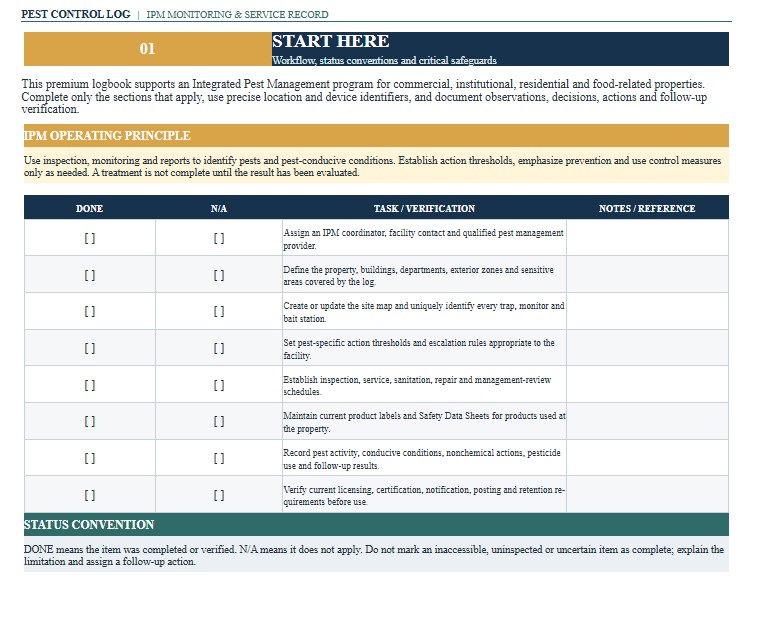
A Pest Control Log Template provides a structured record for monitoring pest activity, documenting inspections, tracking traps and bait stations, recording treatments, and verifying corrective actions. It can be used by restaurants, food-processing facilities, warehouses, property managers, schools, child care centers, healthcare facilities, farms, offices, hospitality businesses, and pest management contractors. A complete log helps identify recurring pest patterns, conditions that attract pests, missed follow-up work, and locations requiring additional attention. It may also support integrated pest management programs, internal audits, customer requirements, food-safety plans, and inspections by regulatory or certification bodies. This page provides downloadable Word, PDF, and Excel versions of the Pest Control Log Template, together with practical guidance for completing and using the record. The Word version supports customization, the PDF version provides a consistent printable form, and the Excel version is useful for tracking repeated inspections, devices, sightings, products, service dates, corrective actions, costs, and trends.
Download the Pest Control Log Word Template
The Word format is useful when a business, property manager, facility operator, school, farm, or pest management company wants to edit the document freely before printing, sharing, signing, or adapting it to a particular building, industry, inspection program, pest control contract, or internal procedure.

Download the Pest Control Log PDF Template
The PDF format is useful for printing, archiving, sharing, or maintaining a fixed-layout pest control record with inspection reports, service tickets, pesticide labels, safety data sheets, trap maps, photographs, invoices, corrective-action records, and facility compliance documents.
Download the Pest Control Log Excel Template
The Excel format is useful for facilities that need repeatable rows, inspection schedules, device inventories, pest counts, treatment quantities, dates, responsible persons, costs, follow-up deadlines, status tracking, or trend analysis across several rooms, buildings, properties, or service locations.
How to Complete and Use This Document
Begin by identifying the facility, property, department, or customer location covered by the log. Enter the business or organization name, street address, building or site number, responsible manager, pest management contractor, service contact information, reporting period, and any internal account or contract number. For multi-building operations, use a separate log or clearly coded entries for each structure so that inspection findings remain traceable to the correct location.
Define the scope of the pest management program before recording individual visits. Identify the areas included, such as kitchens, receiving docks, storage rooms, production areas, dining rooms, waste areas, exterior perimeters, mechanical rooms, offices, guest rooms, classrooms, or animal areas. Record the inspection frequency and assign responsibility for routine monitoring, contractor service, sanitation corrections, repairs, and management review.
Use consistent location names and device identification numbers. Every trap, insect-light device, bait station, monitoring board, or other control device should be linked to a specific location. A corresponding site map can help inspectors locate devices and identify patterns over time. Do not use vague descriptions such as “back area” when a precise room, wall, door, equipment line, or station number can be recorded.
For each inspection, enter the date, time, inspector or technician, weather conditions when relevant, areas inspected, and service type. Record the pest species or suspected pest as accurately as possible. Include rodents, cockroaches, ants, flies, stored-product insects, birds, termites, bed bugs, mosquitoes, or other pests as appropriate. When the pest cannot be confirmed, mark the identification as provisional and retain a sample or photograph when safe and practical.
Document the evidence observed rather than recording only “pest present.” Useful details include live or dead pests, droppings, gnaw marks, tracks, nests, webbing, larvae, damaged packaging, grease marks, odors, burrows, structural openings, trap captures, customer complaints, or employee sightings. Enter the number observed or captured when possible. Consistent counts make it easier to evaluate whether pest activity is increasing, decreasing, or moving to another part of the facility.
Record conditions that may attract or support pests. These can include standing water, plumbing leaks, food residue, open ingredients, damaged packaging, overflowing waste, vegetation against the building, unsealed wall penetrations, broken screens, gaps beneath doors, clutter, inaccessible cleaning areas, or improper storage. Assign each condition a corrective-action number, responsible person, target date, completion date, and verification status.
When a pesticide or pest control product is applied, record the product name, EPA registration number shown on the label, target pest, application site, application method, amount or rate used, date and time, and the applicator’s name or license information when applicable. Also record any required reentry, ventilation, posting, notification, food-protection, cleanup, storage, or disposal precautions. The product must be used only at sites, rates, and for pests permitted by its label.
Do not treat the template as authorization for an untrained employee to apply pesticides. Certification, licensing, supervision, notification, posting, record retention, restricted-use pesticide, school, child care, healthcare, housing, food establishment, agricultural, and commercial application rules vary by state and locality. Verify current requirements with the applicable state pesticide regulatory agency, health department, agriculture department, school authority, housing agency, or other regulator.
For food establishments and food-related operations, coordinate the log with sanitation, receiving, waste management, structural maintenance, and food-protection procedures. Pesticides should not contaminate food, equipment, packaging, utensils, or food-contact surfaces. Record any product disposal, cleaning, product hold, damaged packaging, or affected inventory resulting from pest activity.
Schools, child care centers, healthcare facilities, multifamily housing, organic operations, and audited food facilities may require additional fields or separate records. These can include occupant notification, sensitive-area restrictions, approved-product lists, organic certification review, contractor credentials, service reports, safety data sheets, complaint records, and management approval. Customize the template to match the organization’s integrated pest management plan and contract requirements.
After each visit, review open actions and schedule follow-up inspections. A treatment should not be marked successful solely because a product was applied. Verify whether pest activity declined, the source was removed, entry points were corrected, traps remained functional, and sanitation or maintenance work was completed. Repeated activity may require revised identification, expanded monitoring, structural correction, or evaluation by a qualified pest management professional.
Retain completed logs with the device map, contractor reports, pesticide labels, safety data sheets, photographs, invoices, complaints, training records, licenses, and corrective-action evidence. Record retention periods are not uniform across every industry or jurisdiction. Confirm the applicable federal, state, county, city, customer, certification, insurance, and company requirements before establishing a destruction schedule.