
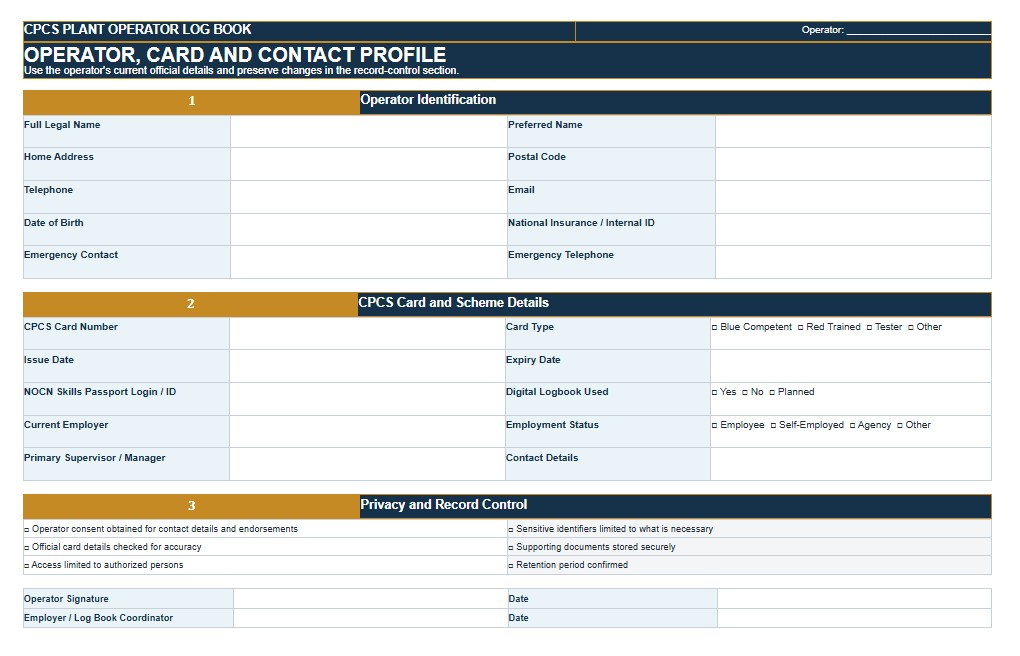
A CPCS Log Book is used to record a construction plant operator’s practical experience, equipment categories, operating hours, job locations, training, assessments, employment history, and supervisor endorsements. CPCS refers to the Construction Plant Competence Scheme, a United Kingdom credentialing program rather than a United States federal certification system. For a U.S. audience, this template can also serve as a structured plant and heavy-equipment operator experience log for internal competency records, employer verification, training documentation, and project assignments. It may be useful for operators of excavators, loaders, cranes, forklifts, telehandlers, compactors, graders, and other construction equipment. This page provides downloadable Word, PDF, and Excel versions of the CPCS Log Book, together with practical guidance for completing, reviewing, customizing, and retaining the record. Users seeking official CPCS card renewal evidence should confirm the current scheme requirements and use any required official digital system, application, endorsement, or verification process.
Download the CPCS Log Book Word Template
The Word format is useful when you want to edit the log book freely before printing, sharing, signing, or adapting it to a particular operator, employer, equipment category, training provider, construction project, or company competency program. Additional operating records, endorsement statements, and category-specific fields can be added as needed.

Download the CPCS Log Book PDF Template
The PDF format is useful for printing, archiving, sharing, or maintaining a fixed-layout version of the log book. It can provide a consistent record for the operator, employer, supervisor, training provider, assessor, contractor, or project file.
Download the CPCS Log Book Excel Template
The Excel format is useful when the log book contains repeatable operating records, equipment categories, dates, working hours, cumulative totals, training events, endorsements, employers, projects, or multiple operators. It can also support automatic hour calculations, category summaries, renewal tracking, and searchable historical records.
How to Complete and Use This Document
Begin by entering the operator’s full name, contact information, employer, employee or payroll number when appropriate, card or credential number, card expiration date, and the date the log book was started. When the record is being maintained for an official CPCS purpose, enter the operator’s details exactly as they appear on the applicable card and confirm that the template is accepted for the intended renewal or verification process. CPCS is a United Kingdom scheme and is not an OSHA license or a general U.S. equipment operator certification.
Create a separate operating record for each equipment category or endorsement. Identify the category code when known, the machine type, manufacturer, model, asset or fleet number, attachment, capacity, configuration, and any category-specific endorsement. For cranes and lifting equipment, additional details may include crane type, lifting configuration, capacity, duties performed, lift-plan reference, and whether the operator acted as an operator, supervisor, appointed person, signal person, or another defined role.
For each operating period, record the start date, end date, project or employer, jobsite location, machine used, work performed, and actual operating hours. Operating hours should represent time spent using or controlling the machine for relevant work. Travel, meal breaks, extended standby periods, unrelated duties, and equipment downtime should not be included unless the applicable scheme or company procedure states otherwise. When the same equipment is used for an extended assignment, periodic entries are generally more useful and verifiable than one broad entry covering an entire year.
Describe the work in sufficient detail to demonstrate meaningful experience. An entry should identify activities such as preparing the machine, completing pre-use checks, maneuvering to the work area, setting up, excavating, grading, loading, compacting, lifting, placing materials, working near utilities, using attachments, shutting down, securing the equipment, and completing required records. Avoid descriptions such as “general machine work” that do not show the operator’s actual duties or the conditions encountered.
Maintain cumulative hours by equipment category. Review the previous total before adding a new entry and check the arithmetic carefully. The Excel version can automate category totals, but the operator or reviewer should still confirm that duplicate entries, overlapping dates, non-operating time, and incorrect category assignments have not inflated the record. Official CPCS renewal routes may require a specified amount of recent category-specific experience, so current requirements should be verified before submitting renewal evidence.
Each operating entry should be endorsed by a person who has direct knowledge of the operator’s work and sufficient authority to verify it. Depending on the workplace, this may be an employer, site manager, superintendent, plant manager, qualified supervisor, assessor, or another authorized representative. Record the endorser’s full name, position, employer, contact information, signature, and endorsement date. Operators should not self-endorse unless the applicable scheme expressly permits it and the required alternative verification is provided.
The endorsement should confirm only what the reviewer can reasonably verify. It may address the operator’s ability to prepare the equipment, conduct required checks, maneuver safely, set up correctly, follow instructions, work within operating limits, perform assigned tasks efficiently, observe company rules, shut down securely, and maintain appropriate records. An endorsement should not be used to conceal incidents, unauthorized operation, missing qualifications, or unverified hours.
Use separate sections to record employment history, formal training, refresher training, practical tests, assessments, toolbox talks, continuing professional development, manufacturer instruction, and category additions. Include the provider, course or assessment title, date, duration, result, certificate number, expiration date when applicable, and supporting document reference. Attach or index copies of certificates and assessment records instead of relying only on a brief handwritten entry.
For U.S. operations, customize the template to include the employer’s equipment authorization, training evaluation, project requirements, and applicable federal or state safety procedures. OSHA standards may require training, evaluation, authorization, inspection, or certification for particular equipment and tasks, but requirements differ by equipment type. Forklifts, cranes, aerial lifts, earthmoving machinery, vehicles, and specialized lifting operations should not be treated as though they share one universal operator credential.
Keep the log book accurate, legible, and protected from unauthorized alteration. Corrections should preserve the original entry, identify the person making the correction, state the correction date, and explain the reason. Store supporting records securely and avoid including unnecessary medical, disciplinary, immigration, Social Security, or other sensitive personal information.
This template does not replace an official CPCS digital logbook, card application, practical test, employer declaration, vocational qualification, OSHA record, equipment inspection, operator evaluation, or state licensing requirement. Before relying on it for certification, card renewal, employment qualification, crane operation, public works, union referral, or regulated equipment use, verify the current requirements with the relevant scheme administrator, employer, training provider, contractor, state agency, local authority, or qualified safety professional.